
Download NetworkTrafficView – network monitor, data usage tracker, traffic analyzer, internet usage, network analyzer
Overview
NetworkTrafficView is a lightweight, portable utility designed for users who need real-time insight into their network activity. Developed by NirSoft, this tool enables users to monitor all incoming and outgoing data packets on their network interface without requiring installation. Its primary purpose is to provide transparency into internet usage, helping users identify which connections are active, how much data is being transferred, and the speed at which it occurs. This makes it particularly useful for diagnosing bandwidth issues, detecting unauthorized connections, or simply understanding how applications are using the network.
The app is ideal for both casual users seeking to monitor their internet consumption and technical users needing detailed network diagnostics. It runs directly from a USB drive or local folder, making it highly portable and suitable for use across multiple devices. While the developer did not provide additional technical details about system integration or background processes, its lightweight nature suggests minimal impact on system performance. NetworkTrafficView fills a niche in the utilities category by offering a no-frills, focused solution for network monitoring, especially in environments where installation restrictions apply.
Key Features & Functionality
- Real-time Network Monitoring: The application begins collecting data immediately after selecting a network interface, providing live updates on active connections and data flow.
- Comprehensive Data Tracking: It captures detailed information including source and destination IP addresses, packet size, transmission speed, and connection duration, enabling users to analyze traffic patterns.
- Portable Operation: With no installation required, NetworkTrafficView can be used on any Windows machine from a USB drive or local directory, ensuring consistent access across environments.
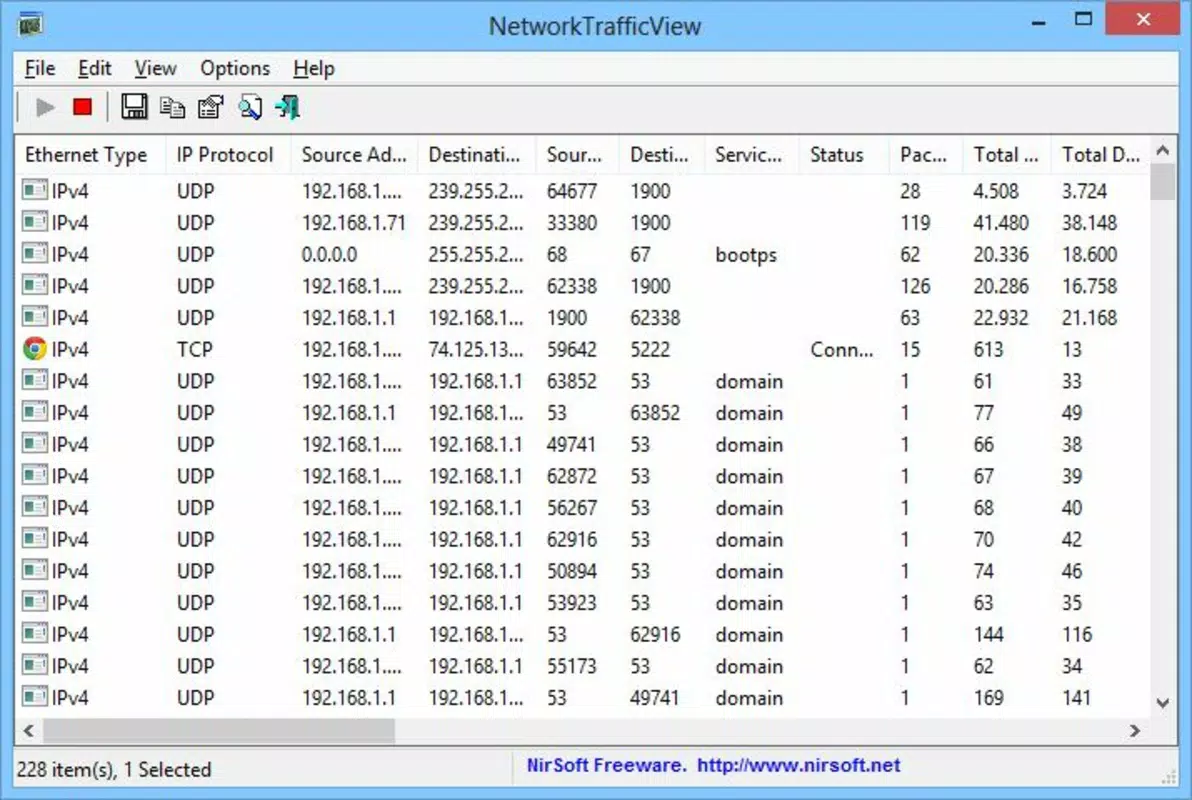
- Simple Interface: The tool features a clean, straightforward layout that displays network activity in a tabular format, making it easy to interpret without prior technical training.
- Lightweight Design: At just 356 KB, the application consumes minimal system resources, allowing it to run efficiently even on older or low-spec devices.
For example, a user concerned about excessive data usage can quickly identify which remote IP addresses are consuming bandwidth. Similarly, a network administrator can use it to detect suspicious activity or verify that only authorized applications are communicating externally. The real-time nature of the data ensures timely awareness, making it a practical tool for both personal and professional use.
Interface, UX & Performance
NetworkTrafficView presents a minimalistic interface centered around a clear table view of network traffic. The layout prioritizes readability, with columns for IP addresses, data size, speed, and connection duration. Navigation is straightforward—users select a network interface from a dropdown menu and begin monitoring with a single action. The absence of complex menus or settings reduces cognitive load, making it accessible to users with limited technical knowledge.
Although the developer did not list formal performance metrics, the application’s small size and portable nature suggest it operates efficiently across various Windows device categories, including desktops, laptops, and older systems. It maintains responsiveness during active monitoring, with no reported lag or crashes in available documentation. Stability appears consistent, particularly given its non-invasive design and lack of background services. The tool does not require elevated permissions to function, which enhances usability and reduces security concerns.
Platform Compatibility & Technical Requirements
NetworkTrafficView is designed exclusively for the Windows platform and is compatible with Windows operating systems. The specific version requirements were not listed by the developer. The application size is 356 KB, which reflects its lightweight and efficient design. It does not require installation, allowing it to run directly from any accessible directory, including removable drives.
The developer did not specify minimum OS requirements, nor did they provide details about driver dependencies or compatibility with specific Windows versions. However, given its long-standing presence in the NirSoft suite of tools, it is likely compatible with modern Windows releases. Users should ensure their system supports standard network interface access for optimal functionality.
Pros and Cons
Pros
- Extremely lightweight at only 356 KB
- Portable—no installation required
- Real-time monitoring of network traffic
- Simple, intuitive interface suitable for all users
- Free to download and use
Cons
- Only available for Windows, not cross-platform
- No built-in export or reporting features
- Specific OS compatibility details not disclosed
- Basic interface may lack advanced filtering options
- Does not support multiple network interface monitoring simultaneously
FAQ
Is NetworkTrafficView safe to use?
Yes, NetworkTrafficView is a trusted utility developed by NirSoft, a well-known provider of system tools. It does not contain malware or intrusive behavior and operates within standard Windows network access permissions.
Can I use NetworkTrafficView on any Windows computer?
Yes, the application is portable and does not require installation, so it can be used on any Windows machine that supports standard network monitoring capabilities.
Does NetworkTrafficView require admin rights?
It does not require elevated permissions to run, but full network visibility may depend on system-level access, which could vary based on user account settings.
Is there a mobile version of NetworkTrafficView?
No, NetworkTrafficView is currently only available for Windows and does not have a mobile or Android/iOS version.
How often does NetworkTrafficView update?
Updates are released periodically by the developer. The latest version available is 1.63, released on February 6, 2023.
Final Thoughts
NetworkTrafficView stands out as a reliable, no-nonsense tool for anyone seeking transparency in their network activity. Its lightweight footprint, portability, and real-time insights make it an excellent choice for users who want to monitor internet usage without installing additional software. While it lacks advanced features like data export or filtering, its simplicity ensures quick access to critical network information.
It is particularly valuable for individuals troubleshooting bandwidth issues, parents monitoring device usage, or IT professionals performing quick diagnostics. The fact that it’s free and requires no setup adds significant value. For users on Windows who need a straightforward network analyzer, this tool delivers exactly what it promises—clarity, speed, and reliability.
Download NetworkTrafficView now


